Building a Dashcam iPhone App
I have always thought dashcams were a good idea.
You hope you never actually need the footage, of course, but if something happens on the road, having a clear recording can settle questions that would otherwise come down to memory, conflicting stories, or whatever somebody happened to notice in a stressful moment.
The basic job is simple: point a camera at the road, record what happens, and keep the footage around long enough for it to be useful.
So when I started looking at dashcam apps for the iPhone, I assumed this would be a fairly solved problem. Modern iPhones have excellent cameras, plenty of storage, GPS, fast processors, and large displays. Put the phone in a mount, tap a button, and you should have a perfectly capable dashcam.
Instead, I found myself frustrated by the same two categories of apps.
On one side were polished apps with the features you would expect, but they often came with accounts, cloud services, analytics, tracking, or some other system designed to collect and store information that did not need to leave the phone in the first place.
On the other side were the more privacy-focused options. I appreciated what they were trying to do, but many were difficult to use, missing basic features, or built in a way that made privacy feel like a compromise you had to endure.
I did not think those should be the only choices.
You should not have to hand a company a detailed record of your life just to get a good dashcam. You also should not have to use a frustrating, limited app just because you care about privacy.
So I built MightyDash.
The Problem Was Bigger Than Video
A dashcam recording is not just a video of the road.
Depending on the settings, a single trip can include the route you took, the time you left, the speed you were driving, the places you stopped, the people in the car, the conversations you had, the homes and businesses you passed, and the license plates and faces of people who never agreed to be part of the recording.
One clip might not say much. A collection of clips can say quite a lot.
It can reveal where you probably live, where you work, when you are usually away from home, which places you visit regularly, who travels with you, and what your normal routine looks like. Add an account, device identifiers, location history, analytics, and a cloud copy, and what started as a simple safety tool can become a remarkably detailed personal profile.
I am not saying every dashcam company uses every piece of data in the worst possible way. That would not be fair, and different apps have different policies. The problem is more fundamental than that. Once another company has a readable copy, your privacy depends on its security, business model, current policies, future policies, employees, vendors, and whoever might own the product later.
That felt like a lot of trust to ask for something that could work locally.
The simplest solution was not to write a longer privacy policy explaining all the wonderful things I promised not to do with the data. It was to build the app so I never received the data at all.
Privacy Should Be Part of the Architecture
MightyDash is private by design. It does not require an account. It does not upload recordings to a MightyDash cloud. It does not include ads, analytics, telemetry, tracking, or third-party SDKs. The recordings stay inside the app on your iPhone unless you explicitly decide to save or share one.
That is not meant to be a marketing trick. It is a product boundary.
If I do not need your trips to provide the feature, I should not collect your trips. If the app can record, organize, play, and manage videos on the device, there is no reason to route those videos through a server I control.
This also makes the experience simpler. There is no account to create, password to remember, subscription to manage, cloud library to configure, or upload to wait for. You open the app and use it.
That is the part I think gets missed in a lot of privacy conversations. Privacy is often presented as a limitation, as though respecting the user necessarily means removing useful features. But good privacy can make a product easier to use because it removes systems that never needed to be there.
The harder challenge was making sure the rest of the app did not feel stripped down.
Start With the Simplest Possible Job
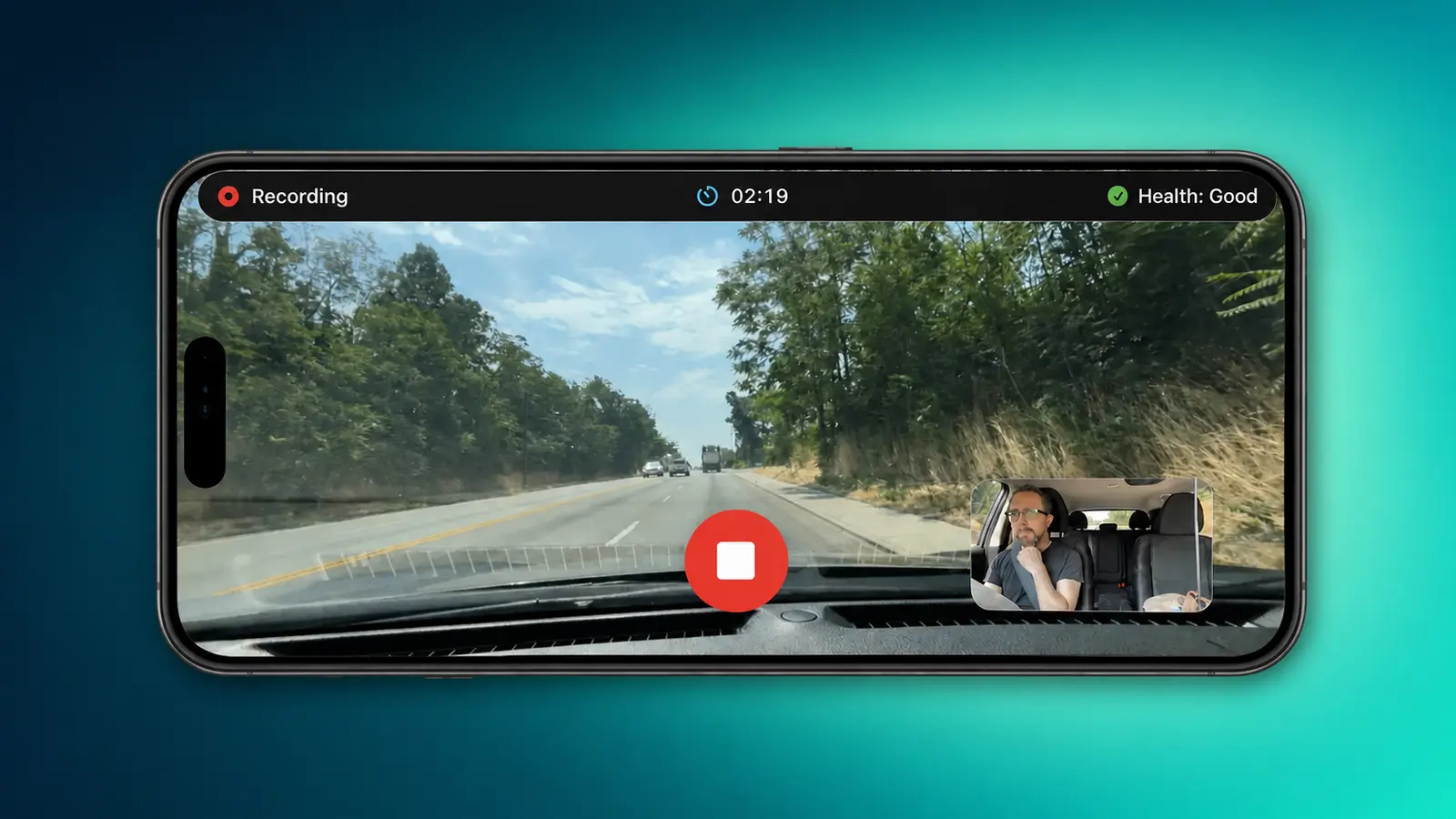
The main recording screen is intentionally straightforward. Mount the iPhone in landscape, open MightyDash, tap record, and drive.
While it is recording, the road stays large on the screen. The elapsed time, recording status, Recording Health, and stop control are easy to find without turning the interface into a cockpit full of gauges. On supported iPhones, you can also see a small preview from the front camera when you are recording both directions.
That simplicity matters because this is an app people use while driving. The interface should not demand attention. It should tell you what is happening, make the important control obvious, and otherwise get out of the way.
There is also an optional display mode that replaces the camera preview with a large clock and, if you choose to enable location, your current speed. The recording status and health information remain visible, and tapping the display briefly brings the camera views back.
The clock and speed are there to make the mounted phone more useful at a glance. They are not burned into the saved video. I did not want to permanently cover part of the recording just because the information was helpful during the drive.
Give People Control Without Making Them Engineers
The simplest dashcam app would have one quality setting and one record button. That would also be a bad fit for a lot of people.
iPhones vary. Storage varies. Mounts vary. A short winter drive in Idaho is not the same as two hours in direct summer sun. Recording in 4K at 60 frames per second with two cameras can create more detail, but it also uses more storage, battery, processing power, and heat than recording one camera at 720p and 24 frames per second.
So MightyDash offers flexible recording settings. You can choose 720p, 1080p, or 4K when the selected camera supports it, choose 24, 30, or 60 frames per second, use the wide or ultra-wide rear camera, and record the front camera at the same time on supported iPhones.
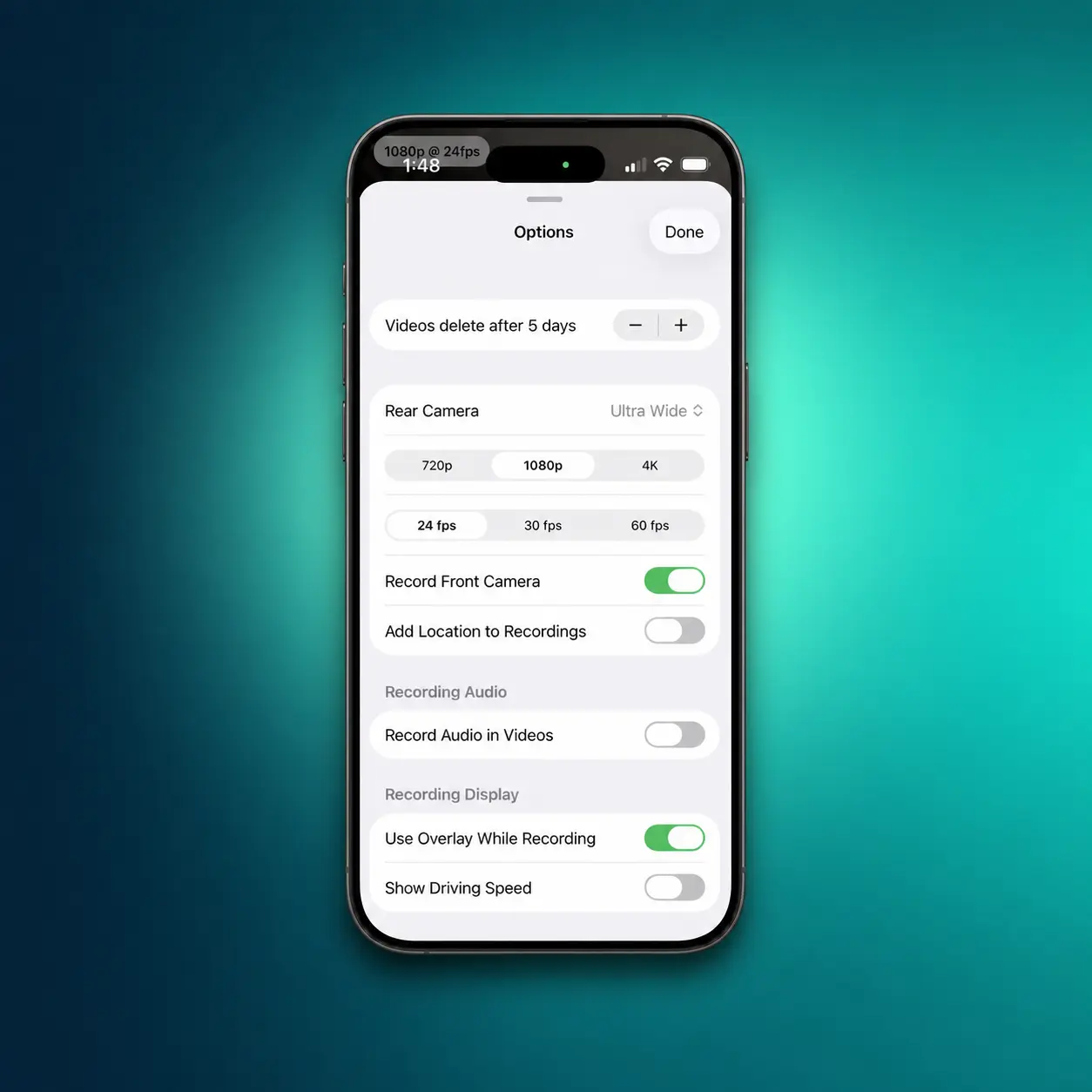
Audio is optional and off by default. Location is optional. The front camera is optional. The large recording display is optional. None of those features should quietly turn themselves on just because the app can access them.
Fresh installs start at a lighter 720p and 24 frames per second. That is not because the iPhone cannot make a beautiful 4K recording. It is because the highest number is not automatically the best experience.
For a dashcam, reliability matters more than winning a specification contest. A slightly less detailed recording that runs comfortably for the entire drive is more useful than an enormous 4K file that overheats the phone halfway there.
The settings exist so the app can fit the person, the phone, and the drive. They are not there to make the person become a camera technician.
The App Should Explain What the Phone Is Doing
Giving people more recording options creates another problem: how are they supposed to know which combination their phone can comfortably handle?
The honest answer is that there is no single perfect setting. Heat changes with the phone, the mount, the weather, charging, screen brightness, direct sunlight, camera choice, resolution, frame rate, and how long the recording runs.
I could have put all of that in a support article and made it the user’s problem. Instead, I built Recording Health.
Recording Health watches how the current setup is handling the drive and reports a simple status before and during recording. It can move from Good to Elevated, Limited, At Risk, or Unavailable as conditions change, with plain-language guidance when the phone needs a lighter recording load or time to cool.
The goal is not to pretend heat no longer exists. A phone sitting in a windshield mount on a hot day is still a phone sitting in a windshield mount on a hot day. The goal is to remove the guesswork.
That distinction is important to me. Good design does not always eliminate a physical limitation. Sometimes it makes the limitation understandable, gives the person useful choices, and helps them avoid a failure before it happens.
A Dashcam Is Also a File-Management Problem
Recording video is only half the job. The other half is dealing with everything that gets recorded.
A single, endless video file is difficult to browse, slow to share, and unnecessarily painful if you only need a few minutes from the middle of a drive. MightyDash saves recordings in manageable segments of about five minutes instead.
The recordings library groups those clips by day and shows thumbnails, timestamps, camera labels, file sizes, and optional city-and-state labels. If the front and rear cameras were running together, their clips remain separate, which makes it much easier to find the angle you actually need.
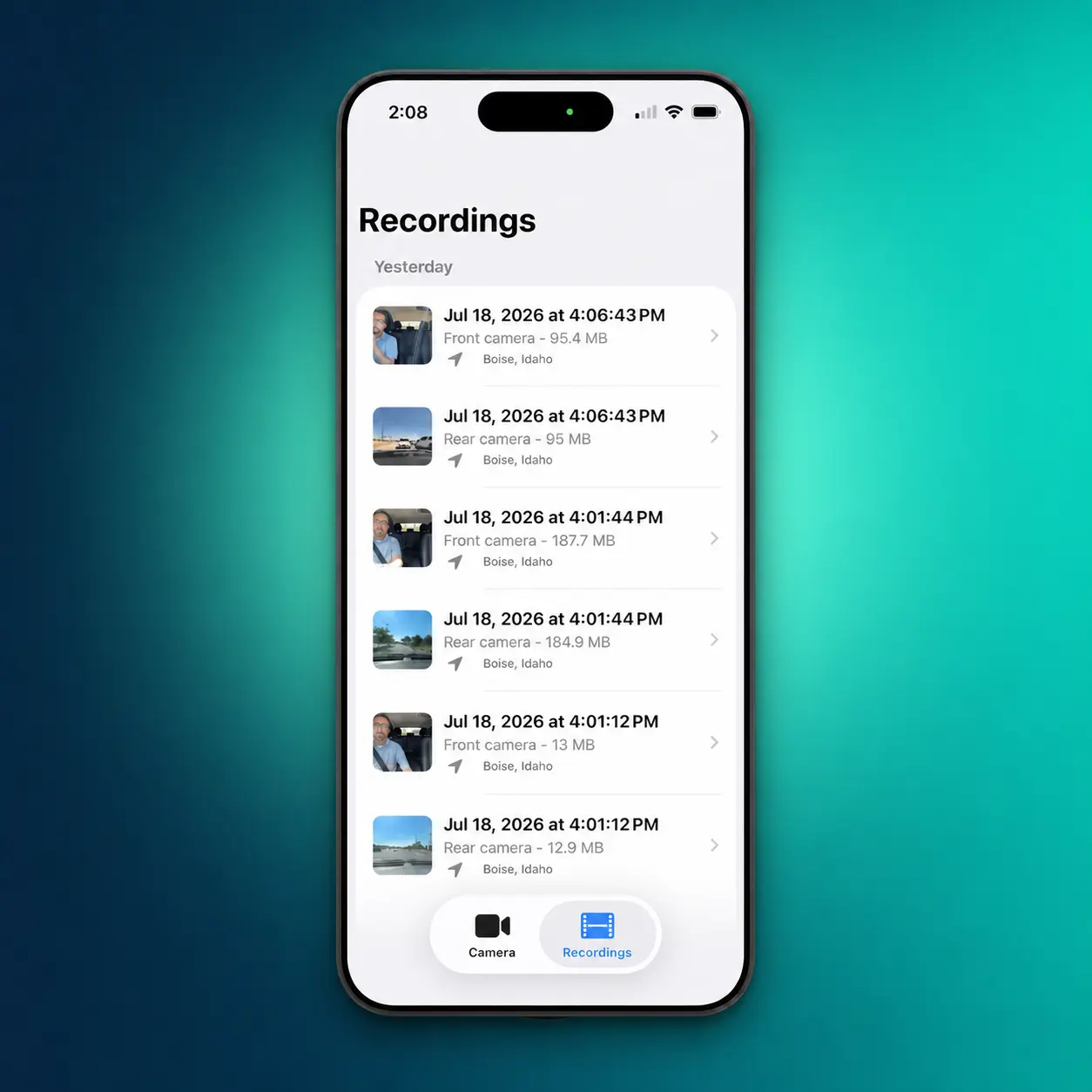
This is not the kind of feature that sounds exciting in a list. It is also the kind of feature that makes the difference between an app that technically records video and an app that is useful when you need to find something later.
Tap a clip and you can play it on the phone, move into full screen, check the time, camera, file size, and optional location label, then decide what to do with it.
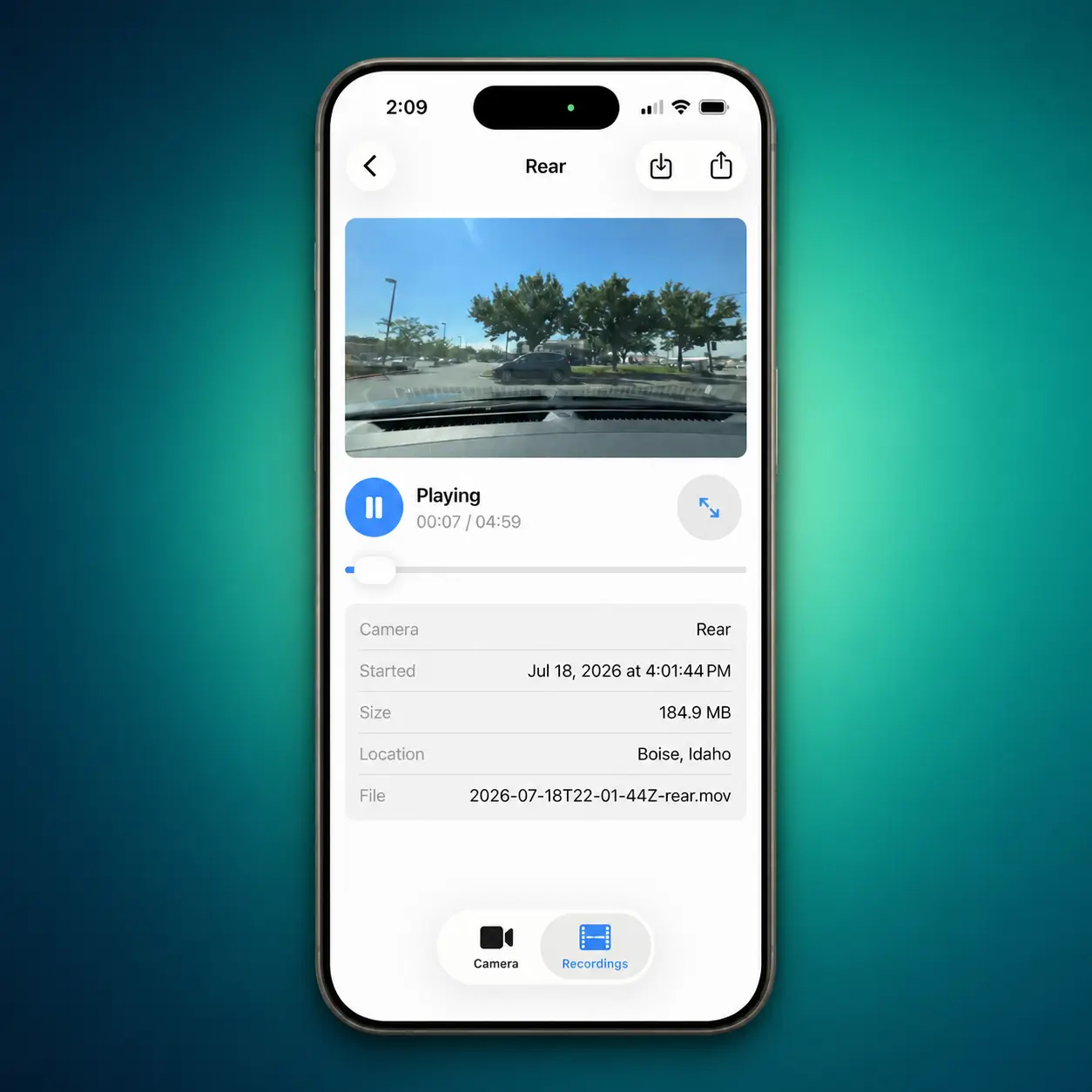
Saving or sharing a recording is explicit. The app does not automatically fill your Photos library with every drive, and it does not automatically upload the footage somewhere else. You choose the clip, choose the destination, and keep control of the copy.
Old Recordings Should Clean Themselves Up
Local storage solves one privacy problem and creates a practical one. Video files are large, and nobody wants to remember to clean out a dashcam app every few days.
MightyDash handles that with automatic retention. You can keep recordings for anywhere from 3 to 30 days, with 7 days as the default. Once a recording falls outside that window, the app removes it automatically.
That gives you a rolling history without turning your iPhone into an archive of every ordinary trip you have taken for the rest of your life.
It also follows the same design principle as the rest of the app: keep what is useful, remove what is not, and do not create more work for the user than the feature is worth.
Better Does Not Have to Mean Bigger
There are things MightyDash intentionally does not do.
It does not have a cloud dashboard. It does not try to identify incidents. It does not build a driving score. It does not create a profile of your routes. It does not keep recording after the app moves into the background, because iOS requires the camera app to remain open and visible.
I would rather be clear about those boundaries than imply the app can do something it cannot reliably or privately do.
At the same time, I did not want “private” to become an excuse for making the rest of the product worse. Privacy does not help much if the app is so limited or unpleasant that nobody wants to use it.
That was the real reason for building MightyDash.
I was frustrated by apps that asked for more data than they needed. I was equally frustrated by private alternatives that seemed to stop at the principle without finishing the product. I wanted the privacy of a local utility with the thoughtfulness, clarity, and basic functionality of a polished app.
Not more features for the sake of having a longer feature list. Better decisions about the features that make the user’s life easier.
A recording screen that is easy to understand. Settings that adapt to different phones and drives. Guidance when the device is under stress. Clips that are easy to find. Storage that cleans itself up. Sharing that happens only when you ask for it. And an architecture that keeps the developer out of your trips.
That is what I wanted from a dashcam app.
So I made it.